The story
Fifteen Minutes of Optimising Saved Eight Seconds
I had tried speed plugin after speed plugin on my client's recipe blog. What finally worked took a quarter of an hour and nothing we had to buy.
By Elena Novak, WordPress & Managed Editor · 6 min read
·
Disclosure: Some links on this page are affiliate links — if you sign up through one, we may earn a commission at no extra cost to you. It never changes our ratings, rankings or verdicts: we don't sell hosting and take no pay-for-placement.

One of my longest-standing clients writes a recipe blog. Mostly slow cooking, a few bakes, and a long running series about what to do with leftover roast chicken. She has been at it for nine years, and in that time she has published about seven hundred posts on WordPress. I built the site for her, and I have looked after it ever since.
Somewhere around the sixth year, the site started to feel heavy. Her admin screens took ages. Saving a post sometimes hung. Visitors, we suspected, were leaving before the page finished loading.
She is not, by nature, a person who deletes things. She keeps every drawer, every old photo, every draft of a recipe she might one day want to compare. That habit is lovely in a kitchen and apparently terrible in a database, although it took me years, and a dinner party, to realise the same instinct was at work on her website.
Plugin after plugin
I did what everyone does, and I’ll admit I did it first. I came from design, and I knew the front of a website far better than the engine room. So I reached for plugins. I installed a caching plugin. It helped a bit. I installed an image compressor. It helped a bit more. I tried a second caching plugin on top of the first, which I now know is a bad idea. I even recommended a premium optimiser that promised a score of ninety plus, and my client paid for a year.
The score improved. The real experience did not. The front page, uncached, still took nearly nine seconds to build on the server. Visitors who landed on a page that was not yet cached felt every one of those seconds.
I had an uncomfortable feeling that I was putting a nice coat of paint on a house with a problem in its foundations. But I could not say what the problem was. Server internals have never been my strong suit, and I was too proud to say so for a few weeks.
Eventually I asked my developer friend why none of the plugins had mentioned it, and she laughed. Plugins that measure page speed generally look at what the visitor receives, the images, the scripts, the style files. They rarely look at how long the server spent assembling the page before sending it. That part is invisible to a lot of tools, and it was the slowest part of the site by a long way.
What my friend noticed
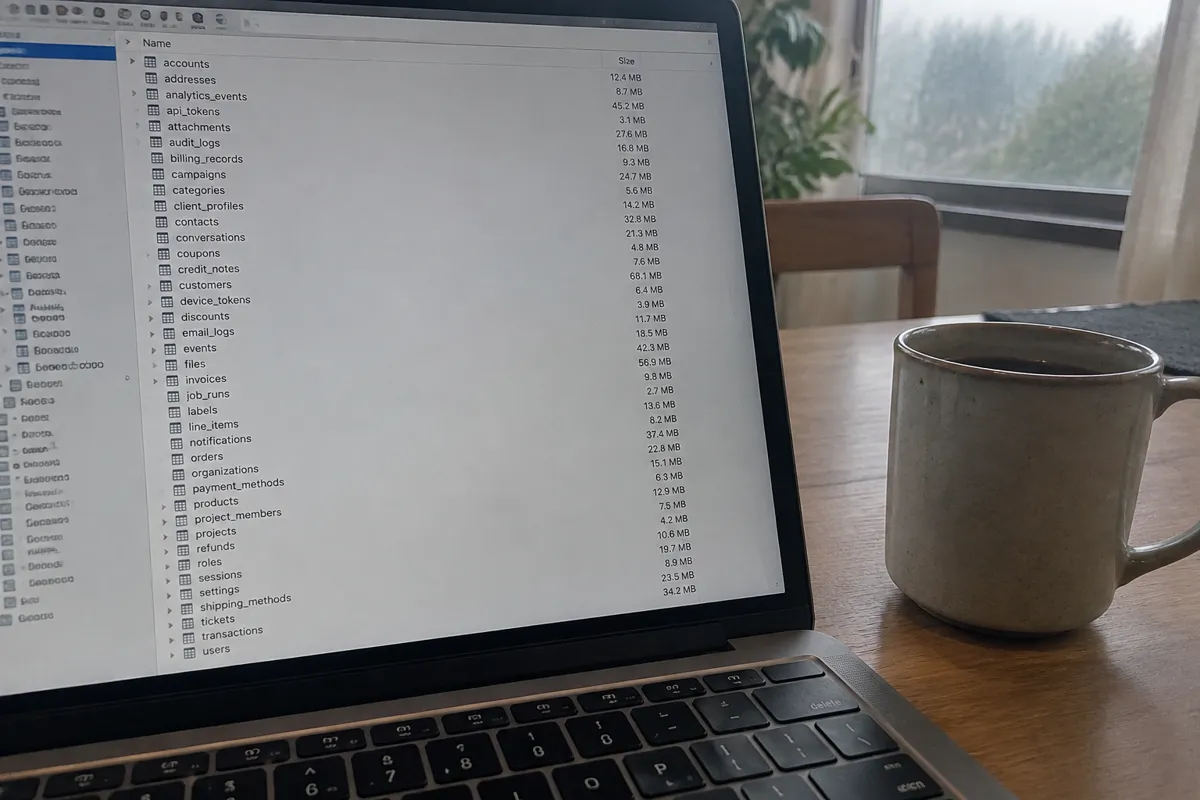
My client invited the two of us to dinner, and after the second glass of wine, I asked my friend to look at the site. She did not look at the front end at all. She went straight into the database tool and sorted the tables by size.
The largest table by far was the one that holds posts. My client had about seven hundred posts, but the table held over twenty thousand rows. Nearly all of them were revisions. Every time she had saved a draft, autosaved, tweaked a comma, WordPress had kept a full copy of the post. Nine years of tweaking. A single recipe had ninety saved versions.
My friend then showed us another table, the options table, which was full of expired transients, temporary bits of data that plugins store and forget to clear. Some were from plugins uninstalled years ago. The options table loads on every page, and this one was several megabytes of clutter.
She also showed me how to check for it myself. In the browser’s developer tools there is a number called time to first byte, which is how long the server takes to begin answering. This site’s had been over three seconds for years. After the cleanup it sat around a third of a second. I now look at that number first, before any score.

Fifteen minutes
Before anything else my friend told us to take a full backup, and we did. Then she used a free cleanup tool to delete old revisions, keeping the latest five for each post. She removed the expired transients, cleared out spam comments and trashed posts, and finally ran an optimise on the tables.
It took roughly fifteen minutes, most of it waiting for progress bars. Then she reloaded the uncached front page. It loaded in just under a second. I asked whether it had been cached. She said no, it was the real page, built from scratch.
I sat there with my mouth a little open. That was eight seconds back without a plugin we had bought. She added a small line to the site’s settings file to cap future revisions at five, and we scheduled a monthly cleanup. The premium optimiser is still installed, and my client still likes her green score, but I now understand the actual speed came from tidying the cupboard, not painting it.
It is oddly humbling to find that nine years of being careful and fussy, editing and rewording, had quietly piled into something that slowed her down. But I also found it kind of sweet. Every one of those ninety versions of her banana bread post was her trying to explain it better.

A few things I’d tell you
Since you’re here, here is what I learned the hard way.
- Take a full backup before cleaning any database.
- Look at table sizes in your database tool. The biggest table is often the clue.
- Clear old revisions and expired transients, and limit future revisions.
- Do not stack two caching plugins on the same site.
- Schedule a monthly tidy, so the bloat does not come back.
I still think of that dinner whenever a client says the site just feels heavy. Nine times out of ten, the answer is already sitting in the biggest table.
To sum it up
- Years of post revisions, transients and orphaned data can bloat your WordPress database.
- A heavy database slows every page, no matter how many caching plugins you add.
- Back up first, then clean revisions, expired transients and spam.
- Limit future revisions so the clutter does not return.